Start with a clean vault
The biggest mistake new Obsidian users make is treating their vault like a filing cabinet before they’ve even written a single note. It’s tempting to create folders for every possible topic, but this premature structure often becomes a cage. Obsidian is designed to be a thinking tool, not just a storage bin. Starting with a blank slate allows your system to evolve naturally from your actual work, rather than forcing your thoughts into pre-existing boxes that may not fit.
Obsidian stores all your data locally on your device as plain Markdown files. This isn’t just a technical detail; it’s the foundation of your long-term security and ownership. Unlike cloud-only note apps, you aren’t locked into a proprietary format or subject to service shutdowns. Your notes are simple text files that can be opened by any text editor, ensuring they remain accessible for decades. This local-first approach means you retain full control over your intellectual property.
Embrace simplicity. As many experienced users recommend, keep your initial organization minimal. Focus on writing atomic notes—short, self-contained ideas—rather than worrying about where they will live in a complex hierarchy. The beauty of Obsidian is that it grows with you. You can add links and structure later, but you can’t easily add lost thoughts. Start small, write freely, and let the connections form organically.
Create a home map of content
Think of your Obsidian vault like a sprawling city. Without a central map, you end up wandering in circles, forgetting where you parked your ideas or losing track of the main streets. The Map of Content (MOC) is that map. It is not a folder; it is a living document that links to your other notes, acting as the primary navigation tool to keep your knowledge base from turning into digital clutter.
Start by creating a single note called Home MOC. This becomes your dashboard. Instead of digging through nested folders, you link directly to the core topics you care about most. This bottom-up approach lets your vault grow organically. As you write more, you simply add new links to your home map, connecting disparate ideas without forcing them into rigid categories.
This structure is particularly valuable for local-first workflows. Because your notes are plain text files stored on your own device, the MOC acts as a lightweight index that never depends on cloud sync speeds or proprietary algorithms. You control the structure, and it remains accessible even if your internet goes down.

Building this map takes only a few minutes. Open a new note, title it Home MOC, and list the three to five main areas of your interest. Link to those notes using [[double brackets]]. Over time, these links will form a web of context, making it easier to retrieve information when you need it most. The goal is not perfection, but clarity.
Use daily notes for capture
Think of your Daily Notes as a digital in-tray. Instead of hunting for the right folder or trying to categorize a thought while it’s still fresh, you dump it into today’s note. This keeps the barrier to entry near zero. You capture the raw thought first and worry about structure later.
Enable the Daily Notes core plugin and open the vault for today. Write freely. Jot down a market observation, a fleeting idea, or a quick question. Do not format it. Do not link it yet. Just let it sit in the day’s stream. This mimics the privacy and local-first nature of Obsidian: your data stays on your machine, uncluttered by cloud sync delays or complex folder hierarchies.
At the end of the day, or during a weekly review, you process these entries. Move the valuable pieces to permanent notes in your Zettelkasten or project folders. Delete the noise. The daily note becomes a temporary holding space, ensuring nothing slips through the cracks while keeping your main vault clean and organized.
Link notes for connections
Link notes for connections is the mechanic that turns Obsidian from a simple text editor into a thinking partner. When you create a bidirectional link between two notes, you are drawing a line between ideas. This is the core of the graph view, where isolated facts begin to form a web of knowledge.
Think of your vault as a city. A note is a building. Without links, these buildings sit in separate fields, hard to navigate and disconnected from one another. Links are the roads. They allow you to travel from one concept to another, revealing how they relate. The graph view visualizes these roads, showing clusters of related topics and bridging gaps between different subjects.
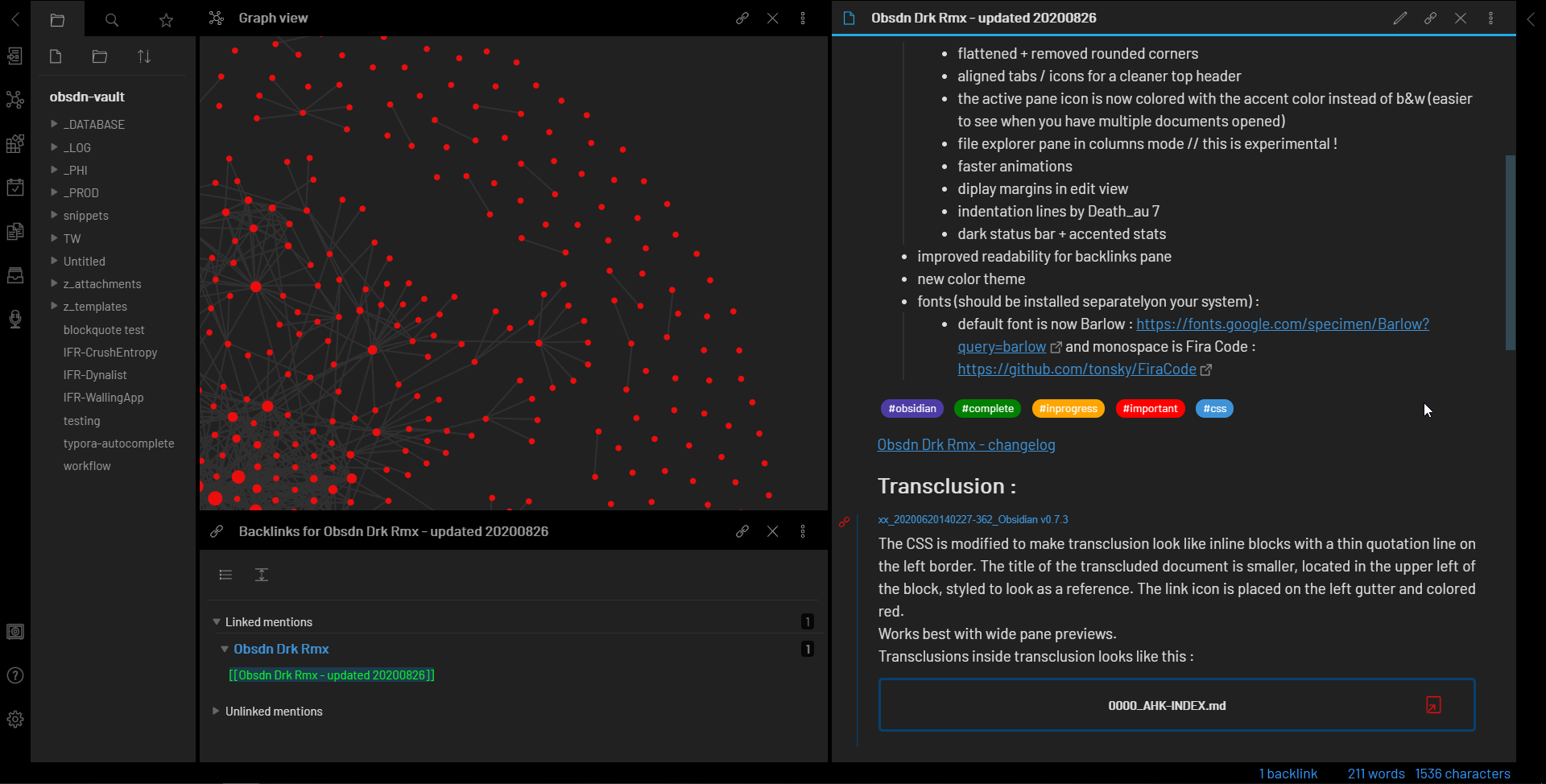
This structure supports a bottom-up approach to organization. Instead of forcing your notes into rigid folders, you let the connections emerge naturally. As you link more notes, patterns appear. You might notice that several notes on market trends also link to a note on economic theory. This emergent structure is often more useful than a pre-planned hierarchy because it reflects how your brain actually makes associations.
The beauty of this system is that it grows with you. You don't need to decide on a perfect folder structure before you start. You just write, link, and let the graph evolve. This local-first approach ensures that your knowledge base remains private and under your control, free from the algorithms of cloud-based platforms.
Pick a theme and plugins carefully
Obsidian is blank by default. That’s a feature, not a bug. It forces you to build only what you actually use. Resist the urge to install fifty plugins on day one. A bloated workspace slows down your notes and distracts you from writing. Start with the core files. Add tools only when a specific gap appears in your workflow.
Choose a dark or light theme
Your eyes matter more than aesthetics. Most users prefer dark mode for late-night sessions, but light mode reduces eye strain during long reading periods. The built-in themes are sufficient for 90% of users. If you want more control, browse the community themes in the settings menu. Look for high download counts and recent updates to ensure compatibility. A clean interface helps you focus on the content, not the chrome.
Install only essential plugins
The community plugins are powerful, but they add complexity. Start with the basics that enhance organization without breaking things. The built-in Graph View shows how your notes connect. The Backlinks panel reveals context instantly. Once you’re comfortable, add one or two plugins that solve a real problem. Avoid "dashboard" plugins that clutter your home screen with widgets you don’t need.
| Feature | Core Obsidian | Community Plugins |
|---|---|---|
| Storage | Local files only | Local files only |
| Sync | Manual or third-party | Manual or third-party |
| Customization | Limited | High |
| Risk | None | Potential bloat |
Think of plugins like furniture. You need a table to write on, but you don’t need a chandelier in a shed. Keep your setup lean. You can always add more later, but removing clutter is harder than it sounds. Prioritize privacy and speed over flashy features. Your notes are yours; don’t let plugins turn them into a subscription trap.
Build your workflow checklist
A vault is only as useful as the habits that keep it clean. Without a routine, notes pile up, links break, and the system feels like a chore rather than a tool. Treat your weekly maintenance like a short workout: focused, consistent, and necessary for long-term health.
Open your last seven daily notes. Scan for any raw thoughts or fleeting ideas that need to be moved into a permanent folder. If a note is just a scratchpad for the day, archive it or delete it. This keeps your inbox zero and ensures only valuable insights remain.
Map of Content (MOC) pages are your home base. Once a week, check if any new notes deserve their own entry or if an existing MOC needs a new link. Think of this as updating a table of contents. It doesn't need to be perfect, but it should point you to the right place when you're looking for specific topics.

Use Obsidian's built-in "Broken Links" and "Unlinked Mentions" tools. Merge any duplicate notes immediately—don't let two files hold the same information. Fix broken links so your graph stays connected. This step takes about ten minutes but prevents the system from becoming fragmented over time.
Ensure your local-first backup is running. If you use Git, make a commit. If you use a cloud sync service, verify the latest sync. This is your safety net. Losing weeks of work because of a sync error is avoidable if you check this once a week.
This routine takes less than an hour a week. The goal isn't perfection; it's momentum. By keeping the structure light, you make it easier to add new ideas without fighting the system.
No comments yet. Be the first to share your thoughts!